Project Overview
Baby Foot Studio is a professional photography studio specialising in newborn, maternity, toddler and family photography.
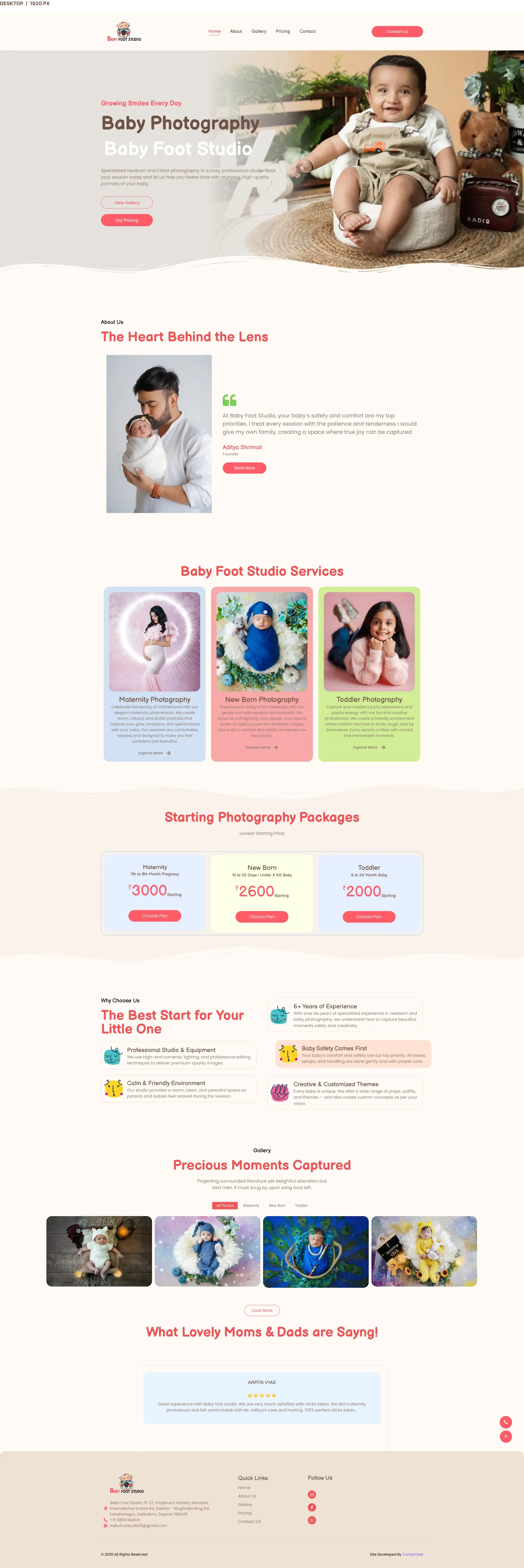
For this project, I designed a complete responsive website experience that presents the studio's photography, services, galleries, pricing and contact information through a clean and visually focused interface.
The UI/UX was planned and organised in Figma, with the final design implemented as a live WordPress and Elementor website.
Project Goal
The main goal was to create a professional digital experience where photography remains the strongest visual element while important information stays easy to discover.
The website needed to help potential clients:
- Understand the Baby Foot Studio brand
- Discover available photography services
- Explore previous photography work
- Review photography packages and pricing
- Build trust through testimonials
- Contact the studio for enquiries and bookings
My Role
I worked on the complete UI/UX design and website experience for Baby Foot Studio.
My responsibilities included:
- UI design
- UX planning
- Website information architecture
- Desktop interface design
- Mobile responsive design
- Visual hierarchy
- Photography focused layouts
- Service presentation
- Gallery experience
- Pricing and package presentation
- Contact and enquiry journey
- Reusable UI patterns
- Figma project organisation
- Design consistency across pages
- Supporting the final website implementation
The Challenge
One of the main challenges was balancing visual storytelling with usability.
Photography websites contain many large images, so the interface needed to provide enough space for photography without making the website difficult to navigate.
Another challenge was presenting multiple photography categories within one consistent experience.
Baby Foot Studio provides services including:
- Maternity photography
- Newborn photography
- Toddler photography
- Family photography
The website needed to communicate all of these services clearly while maintaining a consistent visual identity.
UX Strategy
The website experience was organised around a simple customer journey.
Brand Introduction
Visitors are introduced to Baby Foot Studio through strong photography and clear brand messaging.
The opening experience immediately communicates the studio's photography style and services.
Service Discovery
Visitors can explore different photography services and understand which option matches their needs.
Strong imagery is combined with concise information to make services easy to understand.
Portfolio Exploration
Photography galleries allow potential clients to explore previous work before making an enquiry.
This helps visitors understand the studio's photography style, quality and consistency.
Pricing Evaluation
Pricing and package information is structured so visitors can easily understand available options and compare different packages.
Trust Building
Photography work and testimonials help build confidence and establish credibility.
Enquiry
After exploring the studio, services, galleries and pricing, users are guided towards contacting Baby Foot Studio.
Information Architecture
The project was organised around five primary website page types.
Home
The Home page introduces Baby Foot Studio and combines photography, services, portfolio highlights, pricing, testimonials and calls to action.
About
The About page helps visitors understand the studio, its approach and its brand personality.
Gallery
The Gallery page gives photography maximum visual priority and allows visitors to explore previous studio work.
Pricing
The Pricing page presents photography packages and supporting information through a structured interface.
Contact
The Contact page provides a simple way for visitors to enquire about photography services and bookings.
Home Page Experience
The Home page was designed as the main entry point into the Baby Foot Studio experience.
Large photography sections establish the visual identity of the studio.
The page gradually introduces:
- Studio information
- Photography services
- Portfolio examples
- Pricing information
- Client testimonials
- Calls to action
- Contact opportunities
The hierarchy was designed so visitors are not overwhelmed with information immediately.
Service Presentation
Photography services are presented through visually structured sections instead of large blocks of text.
Each service combines strong imagery with supporting information.
The service experience focuses on:
- Clear visual separation
- Strong photography
- Concise information
- Consistent layout patterns
- Simple calls to action
Gallery Experience
The gallery is one of the most important parts of the website because potential clients want to see previous work before choosing a photographer.
The interface therefore gives photography maximum visual importance.
The gallery helps visitors evaluate:
- Photography style
- Image quality
- Creative direction
- Studio consistency
- Different photography sessions
Pricing Experience
Photography packages can contain a large amount of information.
The pricing interface was designed with clear visual hierarchy so visitors can quickly understand the available options.
The experience helps users:
- Discover available packages
- Understand package differences
- Review included services
- Compare options
- Choose a suitable package
Contact and Enquiry Experience
The enquiry journey was intentionally kept simple.
After exploring services, galleries and pricing, users have a clear next action.
Calls to action throughout the website guide visitors towards contacting the studio without unnecessary steps.
Visual Design Direction
The visual direction was created around the emotional and personal nature of newborn and family photography.
The interface focuses on:
- Clean layouts
- Large photography areas
- Comfortable spacing
- Clear typography
- Simple navigation
- Strong visual hierarchy
- Consistent page structures
- Photography focused presentation
- Clear calls to action
- Responsive behaviour
Responsive Design
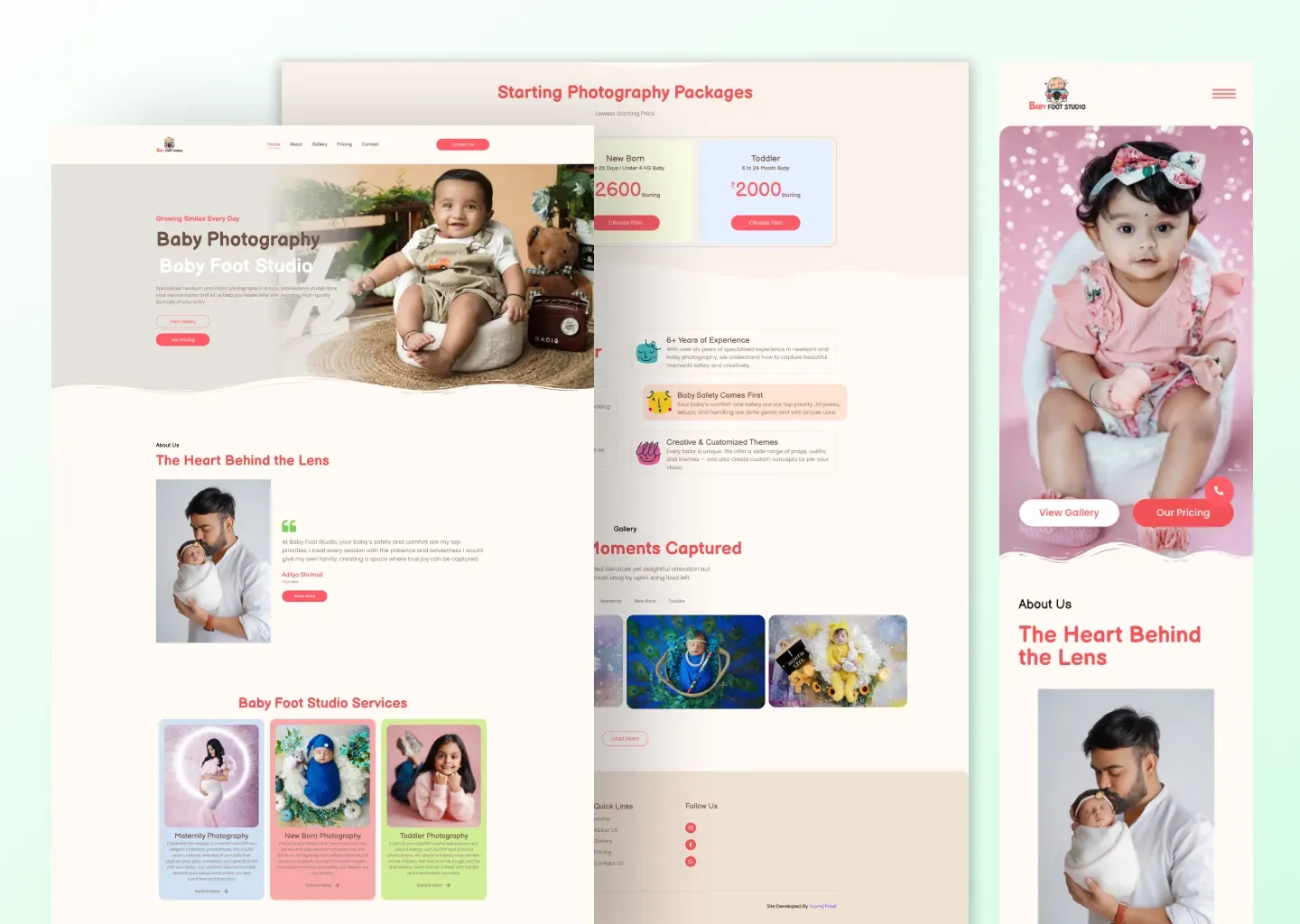
The website was designed for both desktop and mobile devices.
Responsive behaviour was considered during the UI/UX process rather than treating mobile as simply a smaller version of the desktop website.
Important considerations included:
- Content hierarchy
- Image placement
- Typography scaling
- Section spacing
- Navigation
- Pricing presentation
- Calls to action
- Gallery behaviour
Desktop Experience
Desktop layouts provide more space for large photography compositions and wider content structures.
This creates a more immersive photography experience while maintaining clear navigation and content hierarchy.
Mobile Experience
Mobile layouts use a stronger vertical content flow.
The mobile experience focuses on:
- Readability
- Comfortable spacing
- Clear touch targets
- Simplified content flow
- Strong photography presentation
- Accessible calls to action
Reusable Design Patterns
The project uses reusable visual patterns to maintain consistency across the website.
These include:
- Typography hierarchy
- Buttons
- Calls to action
- Image layouts
- Content sections
- Service presentation
- Pricing layouts
- Navigation patterns
- Responsive spacing
- Section structures
Figma Workflow
The project was planned and documented in Figma.
The Figma file contains the Baby Foot Studio client project together with website previews, page coverage and project information.
Design to Development
After completing the UI/UX direction, the design was implemented as a live WordPress and Elementor website.
This allowed the design to move from concept to a real production client project.
The live implementation helped validate the interface with:
- Real client content
- Real photography
- Different screen sizes
- Website navigation
- Service information
- Pricing content
- Actual visitors
Final Result
The final result is a responsive photography website that combines strong visual storytelling with clear navigation and business information.
Visitors can:
- Understand the Baby Foot Studio brand
- Explore photography services
- Browse previous work
- Review photography packages
- Build trust in the studio
- Contact Baby Foot Studio for enquiries
The interface also provides a flexible foundation that can continue evolving as new photography, services and packages are added.
Project Highlights
- Complete client website UI/UX design
- Five primary website page types
- Desktop responsive experience
- Mobile responsive experience
- Photography focused interface
- Structured service discovery
- Gallery experience
- Pricing and package interface
- Testimonial presentation
- Contact and enquiry journey
- Reusable visual patterns
- Figma based workflow
- WordPress and Elementor implementation
- Live production website
Project Information
Client: Baby Foot Studio
Role: UI/UX Designer
Industry: Photography
Project Type: Client Website
Platforms: Desktop Web and Mobile Web
Primary Design Tool: Figma
Implementation: WordPress and Elementor
Status: Live
Live Website: babyfootstudio.com
Figma Project: View UI/UX Project